Choosing the right Content Management System (CMS) is one of the most consequential strategic decisions an organization can make. The CMS is the beating heart of your digital presence, dictating not just how your website looks, but how your marketing teams operate, how secure your data is, how easily your developers can build, and how rapidly you can adapt to market changes.
In the modern digital landscape, two names frequently dominate boardroom discussions, albeit usually at entirely different stages of an organization’s growth: WordPress vs Adobe Experience Manager
Comparing these two platforms is akin to comparing a highly versatile Swiss Army knife to a massive, custom-built industrial manufacturing plant. Both are exceptional at what they do, but they are engineered for entirely different scales, budgets, and operational philosophies. While WordPress powers almost half of the internet through democratization and flexibility, AEM is the undisputed heavyweight champion of the enterprise sector, designed to orchestrate complex, multi-brand, global digital experiences.
This comprehensive guide delves deep into the architecture, cloud evolution, authoring experience, e-commerce capabilities, security, and Total Cost of Ownership (TCO) of both platforms, providing the strategic insights needed to make an informed decision for your organization.
1. WordPress vs Adobe Experience Manager – Defining the Contenders
Before comparing specific technical features, it is crucial to understand the foundational philosophies and target demographics of both systems.
The Democratization of the Web: WordPress
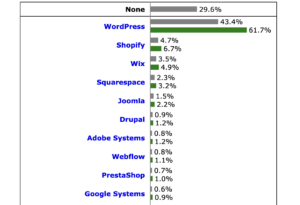
Launched in 2003 as a simple blogging tool, WordPress has evolved into an absolute juggernaut. Today, it commands over 40% of the CMS market share, powering everything from personal hobby blogs to high-traffic publications like Time Magazine, The White House, and TechCrunch.
WordPress is open-source software built on PHP and MySQL. Its core philosophy is accessibility and democratization. It operates on the premise that anyone, regardless of their technical background, should be able to publish content on the internet. It achieves its immense flexibility through a vast ecosystem of third-party plugins and themes, allowing users to bolt on functionality—from e-commerce (WooCommerce) to search engine optimization (SEO)—with just a few clicks.
The Enterprise Juggernaut: Adobe Experience Manager (AEM)
Adobe Experience Manager, born from Adobe’s acquisition of Day Software (CQ5) in 2010, is an enterprise-grade CMS and Digital Asset Management (DAM) system. It is a core pillar of the Adobe Experience Cloud.
AEM is not designed for the average user, small business, or even mid-market firms. It is explicitly engineered for massive, global enterprises that operate across multiple regions, languages, and brands. Companies like Ford, Nike, and leading global financial institutions rely on AEM to deliver highly personalized, omnichannel digital experiences. It is a premium, proprietary product that requires significant capital investment, specialized development teams, and rigorous corporate governance to implement and maintain.
2. WordPress vs Adobe Experience Manager – Core Architecture and the Cloud Evolution

The underlying technology of a CMS dictates its capabilities, the type of developers you need to hire, and how the system interacts with the rest of your enterprise IT infrastructure. Both systems have undergone massive cloud transformations over the last few years.
WordPress: Monolithic but Adaptable
WordPress utilizes a traditional monolithic architecture. The front-end display (the theme) and the back-end database and logic are tightly coupled by default.
The Stack: PHP running on web servers (Apache or Nginx) interacting with a MySQL or MariaDB database.
The Cloud Evolution: Historically hosted on simple shared or virtual private servers, enterprise WordPress now relies on managed cloud platforms like WordPress VIP, WP Engine, or Pantheon. These platforms wrap the open-source core in containerized infrastructure (like Kubernetes), providing automated scaling, high availability, and advanced caching layer isolation.
Pros: The PHP talent pool is massive, making it relatively easy and inexpensive to find developers. The monolithic structure is straightforward to host, test, and deploy locally.
Cons: Because it relies heavily on third-party plugins to extend functionality, the architecture can become bloated, leading to conflicting code, “spaghetti code” structures, and technical debt if not aggressively managed by experienced backend engineers.
AEM: Hybrid, Java-Based Enterprise Stack
AEM’s architecture is fundamentally different, built on a robust, enterprise-proven Java stack designed for decoupling and modularity.
The Stack: Built on a unique triad: Apache Sling (a resource-centric web framework that maps URLs to content nodes), OSGi (Open Services Gateway initiative, a modular framework for Java that allows components to be loaded dynamically), and a JCR (Java Content Repository), specifically Apache Jackrabbit Oak, which stores data as a hierarchical node tree rather than traditional relational tables.
The Cloud Evolution (AEM as a Cloud Service): Adobe completely re-engineered AEM into a cloud-native solution (AEMaaCS). It removed the old paradigm of running fixed “Author” and “Publish” server instances that required manual upgrades. AEMaaCS runs on a dynamic, microservices-based architecture that scales automatically based on traffic and content authoring load. Upgrades are pushed out continuously by Adobe, eliminating the historic, multi-month upgrade projects that plagued AEM 6.5 and older on-premise versions.
Pros: This architecture is incredibly powerful, secure, and resilient. It separates authoring environments from publishing environments entirely, meaning an issue on the authoring side will never crash the live customer-facing site.
Cons: The learning curve is notoriously steep. AEM requires highly specialized, certified Java developers who understand its specific frameworks. These developers are scarce and command premium marketplace salaries.
3. WordPress vs Adobe Experience Manager – The Content Authoring Experience

A CMS is only as good as the tools it provides to the marketing and content teams who use it daily to execute business strategies.
WordPress: Intuitive, Fluid, and Democratic
WordPress is universally praised for its ease of use. With the introduction and maturation of the Gutenberg block editor, WordPress transitioned to a highly visual, modular authoring experience.
Ease of Onboarding: A new marketer can learn the basics of publishing a WordPress post or designing a landing page in less than an hour. The interface is intuitive, uncluttered, and highly forgiving.
Flexibility: Content creators can quickly drag and drop text blocks, images, embeds, and dynamic widgets to build out a page layout on the fly.
The Corporate Risk: While flexible, this freedom can sometimes be a detriment to large organizations. Without strict technical guardrails and heavy customization of user permissions, it is easy for an overzealous content author to break brand guidelines, alter a page’s layout, or accidentally shift corporate typography and color palettes.
AEM: Structured, Governed, and Component-Driven
AEM utilizes a Touch UI that is inherently component-based and built for governance. It is designed less for casual writing and more for assembling complex, dynamic, data-driven layouts.
Authoring Paradigm: Authors build pages by dragging pre-configured “Core Components” (e.g., a “Hero Banner,” a “Product Carousel,” a “Text/Image Grid”) onto a predefined template layout grid.
Enterprise Governance: The defining feature of AEM’s authoring experience is strict structural governance. Developers define exactly how a component behaves, what fields are exposed, and how it renders. Authors can only input content into these strict fields. This ensures that no matter how many hundreds of content authors are working across dozens of countries, the brand’s visual identity remains perfectly consistent.
The Agility Trade-Off: The trade-off for this enterprise control is immediate agility. If a marketing team needs a completely new page layout that requires a component functionality that doesn’t exist, they cannot just go install a plugin or write custom HTML in the editor; they must submit a formal request to the enterprise development team, wait for a sprint cycle, and have the component custom-built, tested, and deployed through the Adobe Cloud Manager CI/CD pipeline.
4. WordPress vs Adobe Experience Manager – Digital Asset Management (DAM) and AI Integration

Modern digital experiences require managing thousands—often millions—of images, videos, PDFs, and 3D localized assets. This is one of the clearest dividing lines between the two platforms.
WordPress Media Library & Emerging AI
The native WordPress Media Library is functional but rudimentary. It allows users to upload files, add basic alt text, captions, and descriptions, and insert them into pages.
Enterprise Limitations: For small to medium sites, it works perfectly well. However, for enterprises with terabytes of media, the native media library falls short. It lacks multi-level folder structures out-of-the-box, robust custom metadata schemas, asset lifecycle management, and advanced version control. To achieve true enterprise DAM functionality in WordPress, you must rely on third-party plugins or integrate an external enterprise DAM via APIs.
AI Evolution: While WordPress relies on third-party plugins like Jetpack AI or Elementor AI to generate images or text within the editor, these tools often lack centralized corporate oversight regarding copyright and brand compliance.
AEM Assets: The Gold Standard with Generative AI Safety
AEM is not just a CMS; it is inherently bundled with a best-in-class enterprise DAM (AEM Assets). AEM Assets is deeply woven into the fabric of the content authoring workflow.
Capabilities: It offers automated asset rendition generation (automatically creating the correct crop and image sizes for desktop, tablet, mobile, and social feeds upon upload), digital rights management (DRM) to prevent the use of expired imagery, and highly complex metadata schemas.
Adobe Sensei and Firefly Integrations: AEM leverages Adobe Sensei (Adobe’s AI and machine learning framework) for automatic smart-tagging of images, making massive libraries easily searchable. Furthermore, with the integration of Adobe Firefly (Adobe’s generative AI), enterprise teams can safely generate images or alter backgrounds directly within the DAM. Crucially for enterprises, Adobe trains Firefly on licensed and public domain content, offering corporate indemnity against copyright claims—a major requirement for legal teams.
Single Source of Truth: A global brand can store a single master creative asset in AEM Assets. If the branding team updates that image, it can dynamically update across every localized country site, mobile app, and third-party channel connected to the ecosystem.
5. WordPress vs Adobe Experience Manager – Scalability, Performance, and Multi-Site Management

As organizations grow, their web properties multiply. Managing this expansion requires completely distinct architectural strategies depending on the platform.
WordPress: Scaling via Infrastructure and Multisite
There is a persistent myth that WordPress cannot scale to handle high volumes of traffic. This is false; however, WordPress out of the box on a basic server cannot scale.
Infrastructure Dependency: Scaling WordPress requires a sophisticated hosting architecture. Enterprise setups leverage database clustering (separating read and write databases), object caching (Redis or Memcached), and aggressive edge caching via CDNs like Cloudflare or Akamai.
Multi-Site Management: WordPress offers a built-in feature called “WordPress Multisite,” allowing a single network administrator to manage a fleet of websites from one dashboard. While highly effective for managing university blogs or a network of simple corporate landing pages, it struggles with complex content inheritance. If you need to share a global product catalog across 50 regional sites, automatically translating content into 15 languages while keeping local pricing distinct, managing this in WordPress requires significant custom-written application layers.
AEM: The Architecture of Global Orchestration
AEM thrives under the pressure of complex, multi-site, multi-lingual deployments. It was engineered from day one for global enterprise localization.
Multi-Site Manager (MSM) and Blueprints: This is AEM’s crown jewel. MSM allows enterprises to create a “Blueprint” master site (e.g., a Global English site). When a new country market opens, AEM can instantly spin up a “Live Copy” of that blueprint.
Content Inheritance Control: If global corporate headquarters updates a product description or a regulatory notice on the master blueprint, that change automatically cascades down to all 50+ live copies worldwide. However, local country marketing teams can choose to “break inheritance” on specific components to localize a banner, offer regional pricing, or swap an image, maintaining global brand alignment while preserving local market agility.
The Dispatcher: AEM utilizes an architecture paired with the AEM Dispatcher—an Apache or Nginx caching and load-balancing tool. It pre-renders and caches static versions of pages at the server level. This allows AEM sites to easily withstand massive concurrent traffic spikes (such as a global product launch or a Super Bowl commercial) because the system rarely has to query the underlying Java database for standard page loads.
6. WordPress vs Adobe Experience Manager – Security, Governance, and Corporate Compliance

For enterprise organizations, healthcare providers, and financial institutions, a digital security breach or a compliance failure is an existential business crisis.
WordPress: The Vulnerability of Popularity
Because WordPress powers over 40% of the web, it is the single most targeted platform for automated malicious attacks, brute-force attempts, and vulnerabilities.
The Core vs. Ecosystem Dichotomy: The WordPress core application software is actually highly secure, maintained by an elite, dedicated global security team. The vulnerability almost exclusively stems from the ecosystem of third-party plugins and themes. A single unpatched plugin built by an independent developer can open a backdoor into an enterprise’s database.
The Maintenance Burden: Keeping WordPress secure requires constant, vigilant governance—updating plugins immediately, subscribing to vulnerability tracking databases (like WPScan), enforcing strict password hygiene, and implementing Web Application Firewalls (WAF).
Workflow Permissions: Out-of-the-box user roles (Administrator, Editor, Author, Contributor) are flat. Creating a complex, multi-tier corporate approval workflow (e.g., Content must be written by an Author, reviewed by an Editor, approved by Legal, and scheduled by a Compliance Officer) requires installing heavy permission-management plugins that alter the core database queries.
AEM: Enterprise-Grade Access Control
AEM is built for highly regulated, risk-averse environments, adhering strictly to global corporate compliance mandates.
Granular Access Control Lists (ACLs): AEM features incredibly deep permission hierarchies. An enterprise IT administrator can restrict a specific user group so they can only edit the text inside a single specific component, on one particular localized sub-page, of a sub-brand’s regional website, while rendering the rest of the ecosystem completely invisible or read-out-only to them.
Visual Workflow Engines: AEM includes a robust, enterprise-grade graphical workflow builder. Organizations can mandate that no content can go live without routing through automated or manual compliance paths, generating immutable audit trails for every single edit, approval, and publishing action.
Closed, Controlled Ecosystem: Because AEM as a Cloud Service operates within Adobe’s secure cloud infrastructure and does not allow arbitrary, community-made plugins to be installed on the fly, the attack surface is dramatically minimized. All custom code must pass through automated security and code-quality scans within Adobe’s Cloud Manager CI/CD pipeline before it can ever touch a production environment.
7. WordPress vs Adobe Experience Manager – The Headless Revolution and Omnichannel Delivery

Modern digital strategy requires content to live far beyond the traditional desktop browser. Content must be pushed seamlessly to native mobile apps, smartwatches, IoT devices, voice assistants, and in-store digital signage.
WordPress as a Headless CMS
WordPress has successfully adapted to the decoupled web trend.
REST API and WPGraphQL: WordPress includes a native REST API within its core software, and the open-source community has developed WPGraphQL, making it highly efficient to query WordPress data using GraphQL. Developers can use WordPress purely as an administrative back-end content database, while building a blazing-fast, modern front-end using frameworks like Next.js, React, or Vue.
The Authoring Disconnect: While technically highly capable, the editorial experience frequently degrades when WordPress goes completely headless. Content authors often lose the visual “What You See Is What You Get” (WYSIWYG) preview capabilities of the Gutenberg block editor, reverting to blind, form-based data entry fields and relying on slow staging builds to see how their content actually looks on the screen.
AEM: True Hybrid Omnichannel Delivery
Adobe has invested tens of millions of dollars into perfecting hybrid headless content management, ensuring that developers get clean APIs while marketers keep their visual design tools.
Content and Experience Fragments: AEM allows authors to create Content Fragments (pure, structured, presentation-agnostic data stored as JSON) and Experience Fragments (structured content bundled with a visual layout and design).
The SPA Editor: This is a massive differentiator for AEM. Through Adobe’s Single Page Application (SPA) Editor, frontend developers can build a web experience using React or Angular, while still allowing content authors to open AEM and visually drag, drop, edit, and preview components directly within that JavaScript application in real-time. Content can be authored once and delivered simultaneously as an experience fragment to a web page and headlessly via GraphQL APIs to an iOS or Android application.
8. E-commerce Integration: WooCommerce vs. Adobe Commerce

For brands driving digital revenue, the interplay between content management and the transactional e-commerce engine is a vital operational vector.
+-----------------------------------------------------------------+
|                      CHOOSE YOUR COMMERCE PATH                  |
+-----------------------------------------------------------------+
|                               |                                 |
|      WORDPRESS + WOOCOMMERCE  |       AEM + ADOBE COMMERCE      |
|                               |                                 |
|  * Unified monolithic DB      |  * Microservices via CIF        |
|  * Highly agile for SMB/Mid   |  * Multi-brand global catalogs  |
|  * Rapid payment setups       |  * High transaction volume      |
|                               |                                 |
+-----------------------------------------------------------------+
WordPress and WooCommerce
WordPress pairs natively with WooCommerce, an open-source e-commerce plugin owned by Automattic (the corporate entity behind WordPress).
The Integration: WooCommerce turns WordPress into a fully functional transactional store. Because they share the same PHP/MySQL database, content and commerce are seamlessly unified. A product is simply another custom post type.
The Enterprise Ceiling: WooCommerce is brilliant for direct-to-consumer (DTC) brands, startups, and mid-market companies. However, because it shares the core database, massive concurrent traffic spikes (thousands of users hitting the checkout button simultaneously) can cause severe database locking and performance degradation unless the database is intensely sharded and optimized.
AEM and Adobe Commerce (Magento)
AEM approaches commerce through the lens of enterprise microservices, integrating natively with Adobe Commerce(formerly Magento) via the Commerce Integration Framework (CIF).
The Integration: CIF provides a standardized, high-performance GraphQL integration layer. AEM handles the rich content storytelling, experience design, and personalization, while Adobe Commerce handles the heavy transactional logic, complex multi-warehouse inventory management, tax calculations, and B2B customer pricing tiers.
The Enterprise Advantage: The systems are decoupled. If the e-commerce database is processing millions of holiday orders, the content presentation layers of the website remain lightning fast and unaffected. It is built to support complex enterprise requirements, such as managing multiple distinct global brand catalogs with distinct currencies and localized inventory across different ERP (Enterprise Resource Planning) systems.
9. WordPress vs Adobe Experience Manager – Ecosystems, Support, and Community

The vitality of a platform’s community dictates how quickly you can troubleshoot issues and how easy it is to find operational support.
WordPress: The Infinite Global Community
The WordPress ecosystem is powered by millions of independent developers, agencies, and enthusiasts worldwide.
Support Structure: There is no centralized “WordPress Help Desk” to call if your open-source site breaks. Instead, support is found organically through extensive documentation, community forums, Stack Overflow, and specialized managed hosting support teams.
The Talent Pool: Because PHP is an accessible web language, finding a WordPress developer is incredibly easy. If you are unhappy with your current web agency, there are thousands of alternative agencies capable of taking over a standard WordPress codebase within days.
AEM: Centralized Enterprise Support and Partners
AEM operates within a closed, highly premium enterprise support infrastructure.
Support Structure: Enterprises sign strict Service Level Agreements (SLAs) directly with Adobe. If a critical system issue occurs, organizations have access to 24/7 enterprise support teams, dedicated Customer Success Managers (CSMs), and the Adobe Experience League—a highly curated training and knowledge base.
The Partner Network: Implementations are almost never handled in-house; they are executed by elite, certified global systems integrators (such as Accenture, Deloitte, or specialized Adobe Platinum Partners).
The Talent Scarcity: Because building on AEM requires deep knowledge of niche Apache frameworks, certified AEM developers are scarce, expensive, and heavily retained by large agencies, creating a high degree of talent dependency for organizations.
10. WordPress vs Adobe Experience Manager – Total Cost of Ownership (TCO) and ROI Realities

The financial investments required for these two platforms represent perhaps their starkest contrast. Organizations must look past the initial software cost to understand the true operational financial model over a multi-year lifecycle.
The True Cost of Enterprise WordPress
While the WordPress core software is open-source and free, running it at an enterprise tier carries significant, ongoing structural expenses.
Licensing: $0 for the core software. Enterprise plugins (SEO, advanced forms, translations) may accumulate $2,000–$5,000 annually.
Enterprise Hosting: Premium, managed enterprise environments (e.g., WordPress VIP) that guarantee 99.9% uptime and enterprise security features typically range from $24,000 to $120,000+ per year, depending on traffic volume and SLA requirements.
Development & Maintenance: Ongoing engineering retainers for security monitoring, code optimization, and custom plugin development.
Average Enterprise TCO: A comprehensive enterprise-tier WordPress deployment, including agency design, custom development, and first-year hosting, typically ranges from $100,000 to $350,000.
The Premium Capital Investment of AEM
AEM is one of the most capital-intensive software suites in the enterprise technology space. It represents a major corporate capital expenditure.
Licensing Fees: Adobe does not publish flat pricing, but licensing for AEM as a Cloud Service is calculated based on volume metrics, such as content scale, traffic, and processing load. Annual licensing fees almost exclusively start in the mid-six-figure range and easily scale to $500,000 to $1,500,000+ per year for large global enterprises.
Implementation Capital: Standing up an AEM ecosystem from scratch is a massive corporate project. Initial implementation by a certified partner agency frequently takes 6 to 12 months and commands capital investments ranging from $500,000 to over $2,000,000 for initial setup, template design, and system integration.
Ongoing Engineering Retainers: Maintaining AEM requires an in-house team of certified Java/AEM engineers or a significant ongoing managed-services contract with an enterprise agency partner.
Average Enterprise TCO: The three-year Total Cost of Ownership for an AEM deployment typically starts at $2,000,000 and can exceed $5,000,000 for diversified, global Fortune 500 companies.
11. WordPress vs Adobe Experience Manager – Core Feature Comparison
| Strategic Dimension | WordPress (Enterprise Tier) | Adobe Experience Manager (AEM) |
| Core Architecture | Monolithic PHP/MySQL; can be decoupled | Cloud-native Java, OSGi, Apache Sling, JCR |
| Primary Licensing Cost | $0 (Open-Source Core) | Premium Annual Fees ($100k – $1M+) |
| Content Authoring | Visual Gutenberg Blocks; flexible and agile | Component-driven templates; highly governed |
| Asset Management (DAM) | Basic Media Library (Requires plugins for scale) | Enterprise AEM Assets; AI Smart Tagging & Firefly |
| Multi-Site Orchestration | Multisite Network (Can be complex to scale) | Multi-Site Manager (MSM) with Live Copies |
| Headless Capabilities | Hybrid via REST API & WPGraphQL | Advanced via Content/Experience Fragments & SPA Editor |
| Security & Auditing | High maintenance; dependent on third-party plugins | Advanced Enterprise Isolation; built-in audit trails |
| E-commerce Pairing | Direct integration with WooCommerce | Enterprise microservices via Adobe Commerce / CIF |
| Development Talent Pool | Massive, highly accessible, affordable | Scarce, highly specialized, premium pricing |
12. The Strategic Verdict: Aligning Platform to Enterprise Maturity

The decision between Adobe Experience Manager and WordPress is rarely a close call once an organization strips away the marketing jargon and looks directly at its own structural scale, operational model, and available technical capital.
When to Standardize on WordPress
Your organization should choose WordPress if your primary business drivers are agility, speed to market, content velocity, and financial efficiency. It is the ideal strategic fit for:
High-Velocity Publishers and Media Companies: Where editorial teams need a frictionless, rapid publishing interface without strict technical layout constraints.
Mid-Market Businesses and Fast-Growing Scale-ups: Who require a beautiful, high-performance digital presence with a fast time-to-market and want to avoid locking up millions of dollars in IT overhead.
Marketing-Led Organizations: Where the marketing department requires absolute autonomy to spin up campaign landing pages, run rapid A/B testing variations using agile SaaS tools, and experiment with design layouts instantly without waiting on an enterprise IT development queue.
When to Commit to Adobe Experience Manager
Your organization should choose AEM if your primary business drivers are global scale, complex localization, strict data security, and multi-channel personalization. It is the necessary choice for:
Global, Multi-Brand Conglomerates: Organizations managing dozens of distinct brand properties across multiple continents and languages that require centralized content inheritance models to ensure strict corporate compliance.
Highly Regulated, Risk-Averse Sectors: Financial institutions, enterprise healthcare networks, and global defense contractors that demand fine-grained access control lists, mandatory multi-step legal workflows, and absolute infrastructure security isolation.
Data-Mature Enterprises Committed to the Adobe Ecosystem: Organizations that have already heavily invested in the Adobe Experience Cloud ecosystem. When natively paired with Adobe Analytics, Adobe Target (for machine-learning personalization), and Adobe Real-Time Customer Data Platform (CDP), AEM becomes the frontend orchestration engine of an unrivaled digital marketing stack capable of executing hyper-personalized customer journeys at an immense global scale.
